
.env you can hand to an LLM, or git add.
LLMs read .env;not anymore.
For LLMs, cat .env is just too tempting, and once it's in the transcript, it's there for good.
The usual ways to live with that:
- Ignore it.
- Trust the provider.
- Rotate the key after it leaks.
Skill issue? There was never a safe way to share a secret, so it went in a file. Being careful never fixed C's memory bugs. Rust did.
Keys stay in a file you commit. Secrets stay in your vault and reach one command at a time. Even that command cannot print one.
Nothing to read
The secret is not in the repository to begin with. Four files become one, and it is the one you commit:
with .env
with monkeys

+foo
@test
OPENROUTER_API_KEY
That file holds the names of the keys the project needs, never their values, which is what a .env.example was for. The secrets sit in your operating system's vault and reach one command at a time. Open the file and there is no line with a secret on it, so an agent that reads everything reads nothing.
Install
One binary, no runtime. The script picks the build for your machine, checks the published checksum, and puts it in ~/.local/bin; Homebrew upgrades it along with everything else.
curl -fsSL https://monk3ys.dev/install | shPlugin
The plugin adds the skill, which makes an agent reach for monkeys instead of asking you to paste a secret. A key you have not remembered comes back as a message saying what to ask for.
The skill is an interface, not a guard. What keeps a secret out of a transcript is that the repository never held it; the skill only means an agent knows where to ask for it instead of asking you.
claude plugin marketplace add eastriverlee/monkeys
claude plugin install monkeys@eastriverlee
The package follows the Agent Plugins layout around an Agent Skills skill, and .agents/skills is the directory its clients share.
Remember a secret once
Type sesame at the prompt. It goes into your vault, the keychain on macOS and the Secret Service on Linux, and nothing you type lands in your shell history.
monkeys remember SUPER_SECRETsecret:
remembered SUPER_SECRET
give it to a command with:
monkeys run SUPER_SECRET <command>Use it in one command
Name the keys the command reads, then the command, written the way you always write it. run puts the secret in that one process and becomes it.
monkeys run SUPER_SECRET sh -c '
  test "$SUPER_SECRET" = sesame && echo opened || echo closed
  echo "the word was $SUPER_SECRET"
'
opened
the word was [redacted SUPER_SECRET]The right word reached the command, and what it printed came back with the secret taken out. The single quotes matter: the shell run starts is the one with the secret, so it has to be the one that expands $SUPER_SECRET.
Without monkeys the door stays shut:
sh -c 'test "$SUPER_SECRET" = sesame && echo opened || echo closed'closedTake the word away and try the door again:
monkeys forget SUPER_SECRET
monkeys run SUPER_SECRET sh -c '
  test "$SUPER_SECRET" = sesame && echo opened || echo closed
'
forgot SUPER_SECRET
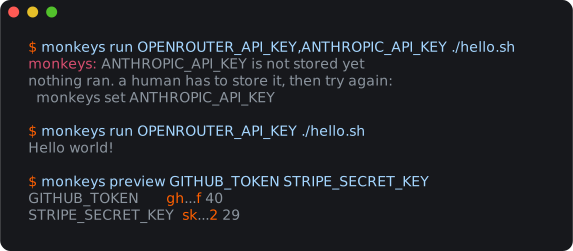
monkeys: SUPER_SECRET is not remembered yet
nothing happened. a human types the secret into:
monkeys remember SUPER_SECRET
then try again.Nothing ran at all. A missing secret stops run before the command starts, and the message says what to do, which is what an agent passes on.
Let the project list the keys it needs
A .monkeys file names its namespace on the first line and lists the keys under a profile. Commit it. In that directory run takes only the command. A value that was never secret sits in the same file as KEY=value. remember keeps that list: a key it does not name is added, a checkout with no file gets one, and drop takes a key back out.
+foo
@test
OPENROUTER_API_KEY#!/bin/sh
curl -s -o /dev/null -w "%{http_code}\n" \
-H "Authorization: Bearer $OPENROUTER_API_KEY" \
https://openrouter.ai/api/v1/keymonkeys run ./hello.sh200A profile line can name several profiles, and a file can hold several blocks; a profile's keys are those of every block that lists it. The first profile is the default, and a prefix that fits one of them is enough, the way a short git hash is.
+foo
@test,production
OPENROUTER_API_KEY
STRIPE_SECRET_KEY
@production
SENTRY_DSN
monkeys run @production ./deployA secret missing in one profile stops that profile alone, and only when it is used. monkeys fill @production --with @test gives the second profile what the first has and it lacks. doctor reads the whole file:
monkeys doctor@test default
✓ OPENROUTER_API_KEY
✓ STRIPE_SECRET_KEY
@production
✓ OPENROUTER_API_KEY
✗ STRIPE_SECRET_KEY
✗ SENTRY_DSNFrameworks read the environment, so monkeys run bun run dev is enough for SvelteKit, Vite or Next. When a tool wants the file itself, poo writes one carrying the same keys with nothing after them, which sets nothing and shadows nothing.
monkeys poo --path .# monkeys' poo. read https://monk3ys.dev/poo
OPENROUTER_API_KEY
PORT=3000Hand the profile to a teammate
pack writes /tmp/a.monsecrets, outside the repository: every profile the file declares, or the ones --only @test names, sealed. It draws the passphrase itself and puts it on your clipboard, never on your screen. Send the file however you like, and the passphrase another way.
monkeys packOn the other machine, unpack asks for the passphrase and puts the secrets in their vault. It writes .monkeys at the root of the checkout, then deletes the bundle. That is the only way a secret leaves the vault.
monkeys unpack ~/Downloads/a.monsecrets